Damn Vulnerable Drone Hands-on (Part 2)
Introduction
In Part 1 I finished the Reconnaissance stage: I cracked the WEP Wi-Fi to get onto the drone network (192.168.13.0/24), then used nmap and Wireshark to identify the Companion Computer (192.168.13.1) and the GCS (192.168.13.14) and their exposed services. That was the “drawing the map” phase. The three targets I flagged back then — 554 (RTSP camera), 14540/5760 (MAVLink), and 3000 (web) — are what I attack here.
Part 2 is four hands-on exercises:
- GPS Spoofing (Protocol Tampering)
- Flight Mode Injection (Injection)
- Companion Computer Web UI Login Brute Force (Injection)
- Camera Feed Eavesdropping (Exfiltration)
I’ll be upfront: of these four, only one succeeded cleanly like the textbook. The rest were either “partial success + a limit discovered” or “the vulnerability is real, but the environment wouldn’t let me reproduce the payoff.” That mismatch, though, is exactly what makes the real structure of MAVLink/drone security visible. This post is not a success story — it’s a record of how far each attack actually reaches, and where it stops.
What changed from Part 1
Reconnaissance didn’t care about the drone’s flight state — port scans and traffic analysis worked whether the drone was powered off or airborne. Most Part 2 attacks are different: they only mean something when the drone is in a particular flight state. DVD triggers these from the management console (http://localhost:8000) — Initial Boot → Arm & Take-Off → Autopilot Flight → Emergency/RTH → Post-Flight — and each button is really the GCS issuing commands to the drone. So the shared precondition for every exercise below is “get the drone flying before you attack.”
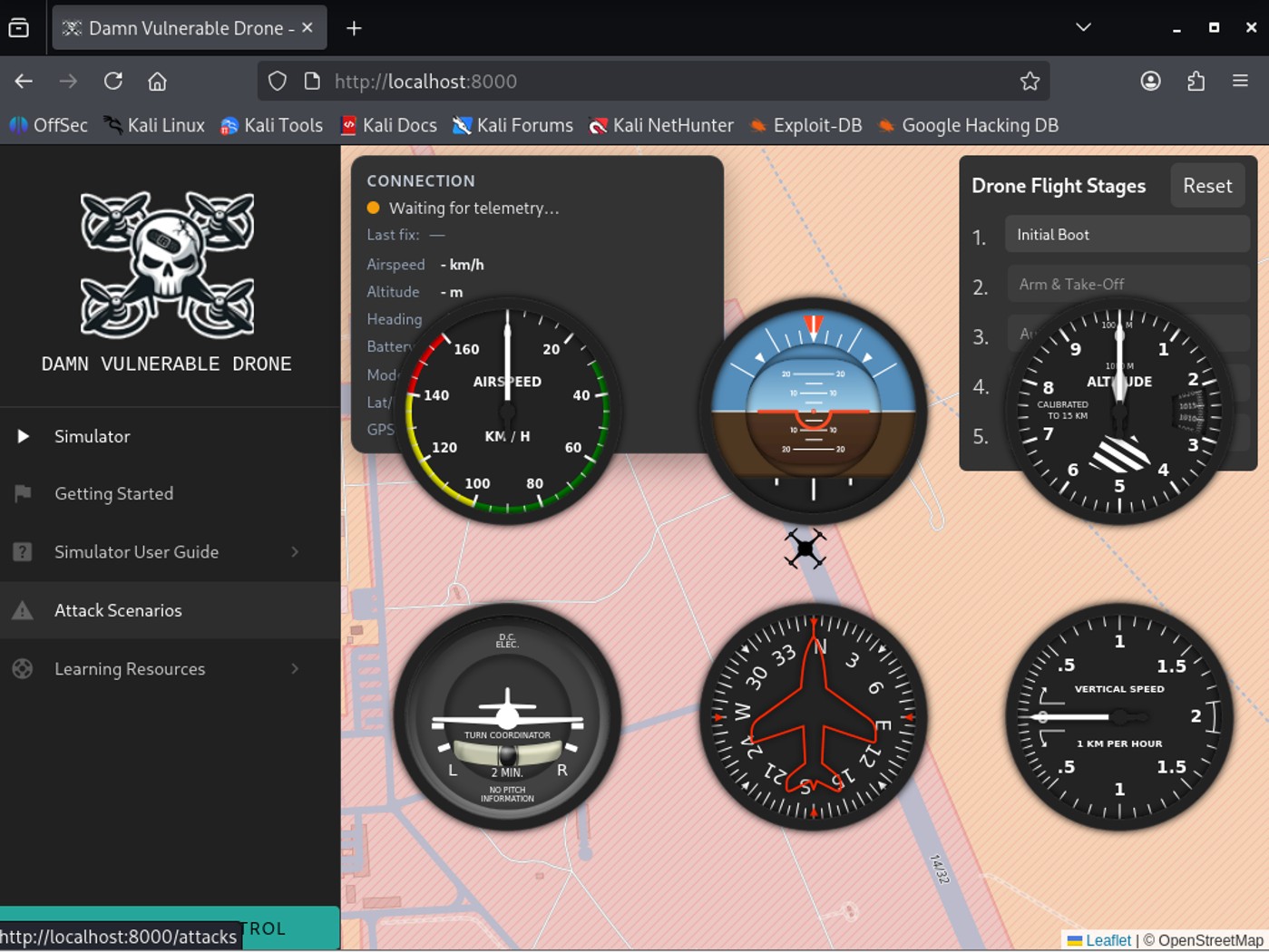 Before any flight state is triggered: the console shows “Waiting for telemetry” and empty gauges. There’s nothing to attack yet.
Environment: Kali Linux on VMware, DVD in Lite mode + Wi-Fi (WEP). The attacker machine is
192.168.13.10, obtained in Part 1.
Exercise 1. GPS Spoofing — the limits of “deception”
Goal
Send forged GPS data to the GCS repeatedly so the operator’s view of the drone’s position diverges from reality. It exploits the fact that MAVLink has no sender authentication — the most basic form of Protocol Tampering.
Concept
The script is actually the same one I prototyped right after breaking in during Part 1. Using pymavlink, it crafts three message types and fires them at the GCS on UDP 14550:
HEARTBEAT— pose as a live airframeGPS_RAW_INT— raw GPS (valid fix, 10 satellites, to look “trustworthy”)GLOBAL_POSITION_INT— the fused position (the value drawn on the map)
The spoofed coordinate is latitude 47.35°, longitude 85.46° — more than 10 degrees away from the real position (near Area 51, latitude 37.24°).
First, the drone has to be airborne so there’s real telemetry to override:
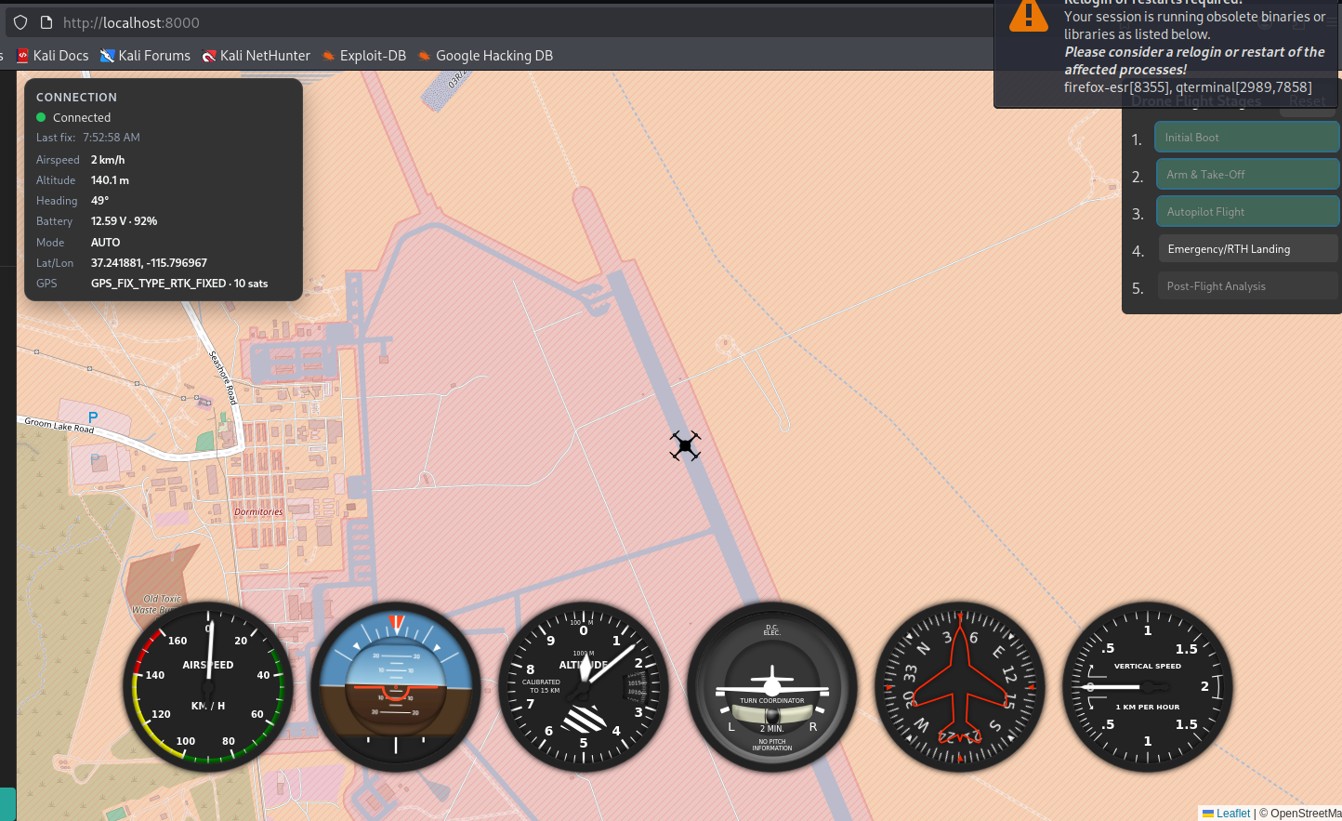 Baseline before the attack: Connected, Mode AUTO, real Lat/Lon 37.241881, -115.796967. This is the “truth” the spoof has to overwrite.
Running it
My first run used time.sleep(0.2) (5 packets/sec) and nothing moved on the map. The reason surfaced quickly — the real telemetry was arriving more often than my spoof and drowning it out. So I raised the rate:
1
2
sed -i 's/time.sleep(0.2)/time.sleep(0.02)/' attacks/gps-spoofing.py
sudo python3 attacks/gps-spoofing.py 192.168.13.14:14550
Result: partial success
The GCS log showed clear evidence that the attack was arriving:
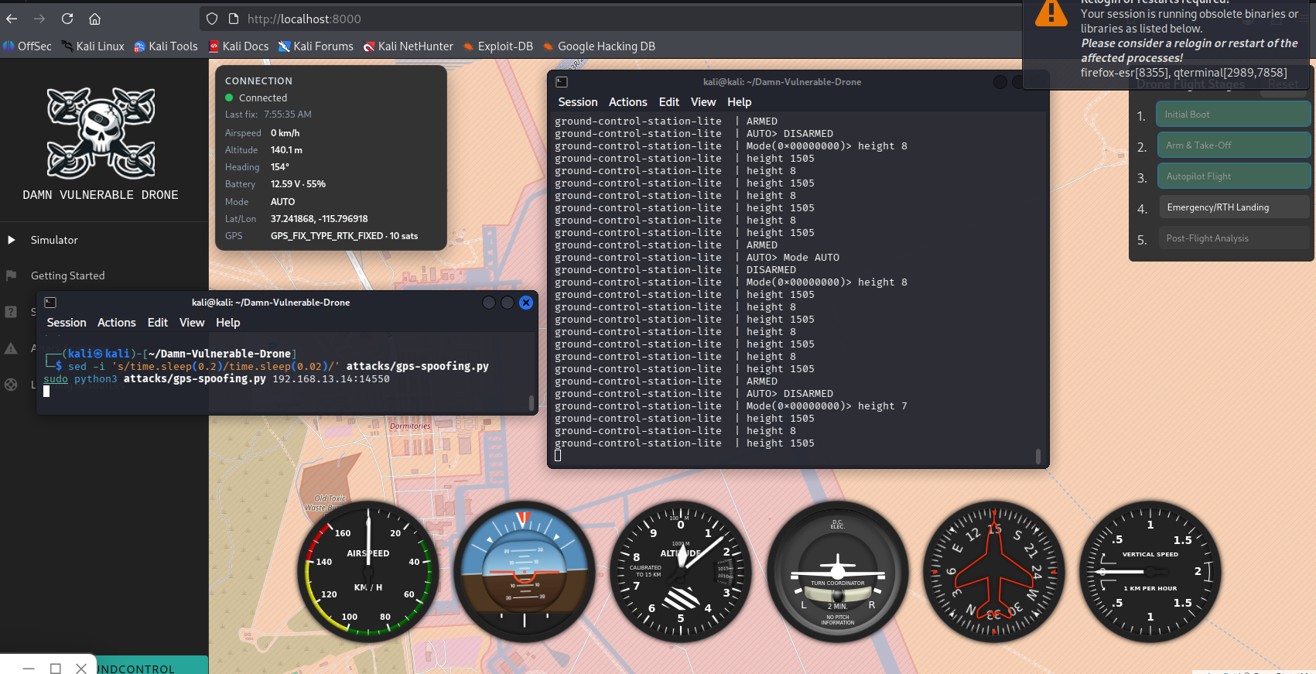 The GCS log alternates between my forged values and the real ones —
height 1505 (my spoof) vs height 8 (real), ARMED vs DISARMED. The GCS is receiving both streams and flip-flopping.
1
2
3
4
5
ground-control-station | Mode(0x00000000)> height 1505
ground-control-station | height 8
ground-control-station | height 1505
ground-control-station | ARMED
ground-control-station | AUTO> DISARMED
And yet the Lat/Lon on the map never budged from 37.24°. I launched QGroundControl to cross-check, and the result was identical — the drone icon stayed pinned to its real coordinates over Nellis Air Force Base.
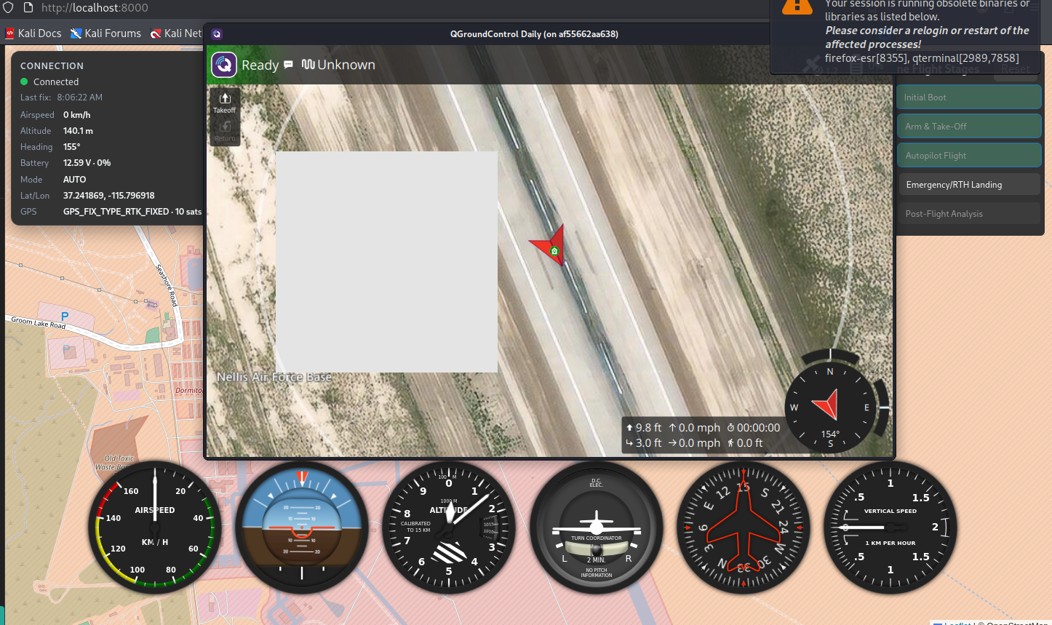 QGroundControl, with the spoof still running: the aircraft stays at the real position. Altitude and mode wobbled; position did not.
Why do altitude and mode shake, but position doesn’t?
This is the key finding. Altitude (height) and state (ARMED/mode) shook under my packets, but position (Lat/Lon) was rejected. The reason is that the GCS doesn’t trust position from a single GLOBAL_POSITION_INT value — it runs it through EKF fusion and validation. A coordinate that suddenly jumps 10 degrees fails the sanity check and gets discarded. Altitude and mode flags have much weaker cross-checking, so they shook freely.
Takeaway: MAVLink spoofing is not an attack where “every field is equally easy to fake.” Fields protected by sensor fusion (position) and fields that aren’t (altitude, state) behave completely differently. Changing a fused position with single-message injection would need a more precise attack targeting
GPS_INPUTor the EKF itself (→ GPS Data Injection).
Exercise 2. Flight Mode Injection — “making it obey”
Goal
If Exercise 1 was about deceiving what the operator sees, this is about injecting a command the drone actually obeys. Using COMMAND_LONG / MAV_CMD_DO_SET_MODE, I change the flight mode without operator authorization.
Tool choice: pymavlink instead of MAVProxy
The wiki walkthrough uses MAVProxy, but by this point my attacker machine was on the drone network and therefore had no internet (the drone gateway owns the default route), so I couldn’t install MAVProxy. Instead I wrote a short pymavlink script that fires a single COMMAND_LONG. It’s the same tool family as Exercise 1’s spoofer, which also makes the “tamper script vs. inject script” contrast cleaner.
A structural quirk of DVD Wi-Fi mode: the moment you join the drone network, your attacker machine’s internet route is replaced by the drone gateway. Finish any external dependencies (tool installs) before you break in.
Snag: there are two airframes
Right after connecting I noticed something odd — the supported-modes list came back different on each run:
- Sometimes:
MANUAL, FBWA, QSTABILIZE, QLAND, AUTOLAND...→ Plane/VTOL,sys=0 - Sometimes:
STABILIZE, ALT_HOLD, LOITER, RTL, LAND, POSHOLD...→ Copter,sys=1
The network has two MAVLink heartbeat sources, and whichever one is latched first decides the airframe type and target_system. With sys=0 latched, LAND returned “unsupported” (Plane uses QLAND); with QLAND it returned “unsupported” again (now latched as Copter, where LAND is correct). Round and round.
Takeaway: before injecting a mode, you have to identify the airframe first via
mode_mapping(). If you don’t know whether the target is a Plane or a Copter, you’ll get the mode name wrong. Reconnaissance doesn’t end at the network layer — it continues down to the protocol layer.
Stabilize + success
To dodge this I changed the script two ways: (1) only accept a heartbeat where sys >= 1, and (2) use set_mode_send instead of command_long and receive the COMMAND_ACK to confirm the vehicle accepted it.
1
2
3
4
5
6
7
8
9
10
11
while True:
    m.wait_heartbeat()
    if m.target_system >= 1:   # ignore sys=0 (aux node), keep the real vehicle
        break

mode_id = m.mode_mapping()[mode_name]
m.mav.set_mode_send(
    m.target_system,
    mavutil.mavlink.MAV_MODE_FLAG_CUSTOM_MODE_ENABLED,
    mode_id)
ack = m.recv_match(type='COMMAND_ACK', blocking=True, timeout=3)
RTL came back with an ACK but the console stayed on DRIFT (RTL transition needs conditions like a home position). Switching to CIRCLE, which transitions unconditionally, worked cleanly:
1
python3 attacks/mode-injection.py tcp:192.168.13.1:5760 CIRCLE
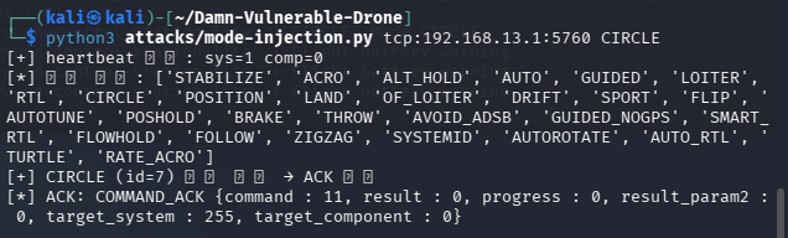 The injection is accepted:
ACK: COMMAND_ACK {command : 11, result : 0, ...}. result : 0 is MAV_RESULT_ACCEPTED — the vehicle explicitly confirms the mode change.
And the management console reflected it:
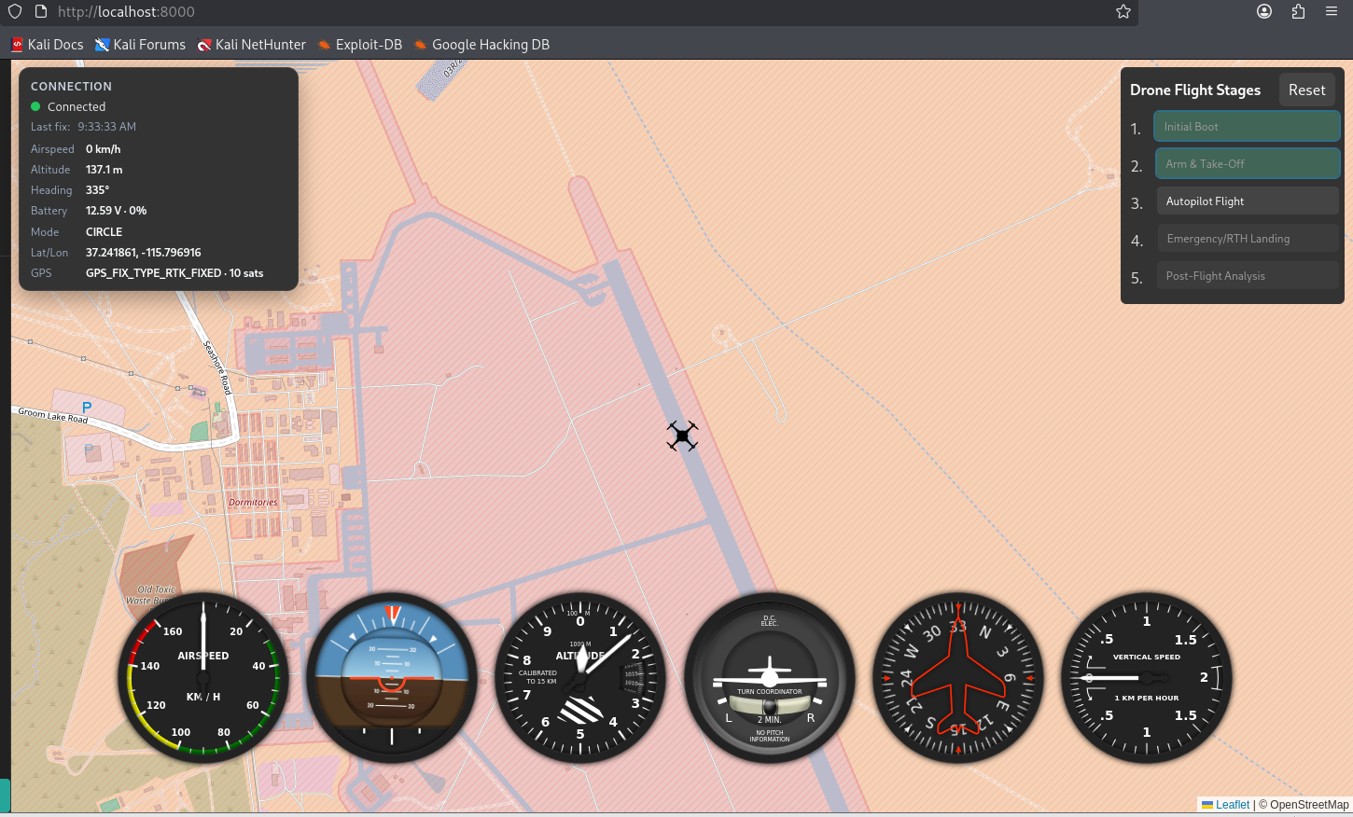 Console Mode is now CIRCLE. The injected command took effect.
The contrast with Exercise 1 — this is the core of Part 2
| Exercise 1 (GPS Spoofing) | Exercise 2 (Flight Mode Injection) | |
|---|---|---|
| Injected into | Observation (telemetry) | Control (command) |
| Message | GLOBAL_POSITION_INT | MAV_CMD_DO_SET_MODE |
| Result | Position rejected by EKF fusion | ACCEPTED, applied immediately |
MAVLink filters observations through sensor fusion, but control commands have no sender authentication and are simply obeyed. This asymmetry runs through all of Part 2. Paradoxically, commanding the drone (Exercise 2) was easier than deceiving it (Exercise 1).
Exercise 3. Companion Web UI Brute Force — a plain web vulnerability
Goal
Take port 3000 from Part 1 — the Companion Computer’s management web login — and brute-force it to establish a foothold. Where Exercises 1 and 2 attacked MAVLink (a drone-specific protocol), this is ordinary web hacking.
Recon: understand the form
I collected hydra’s inputs straight from the browser DevTools. Logging in with admin / test and inspecting the failed request:
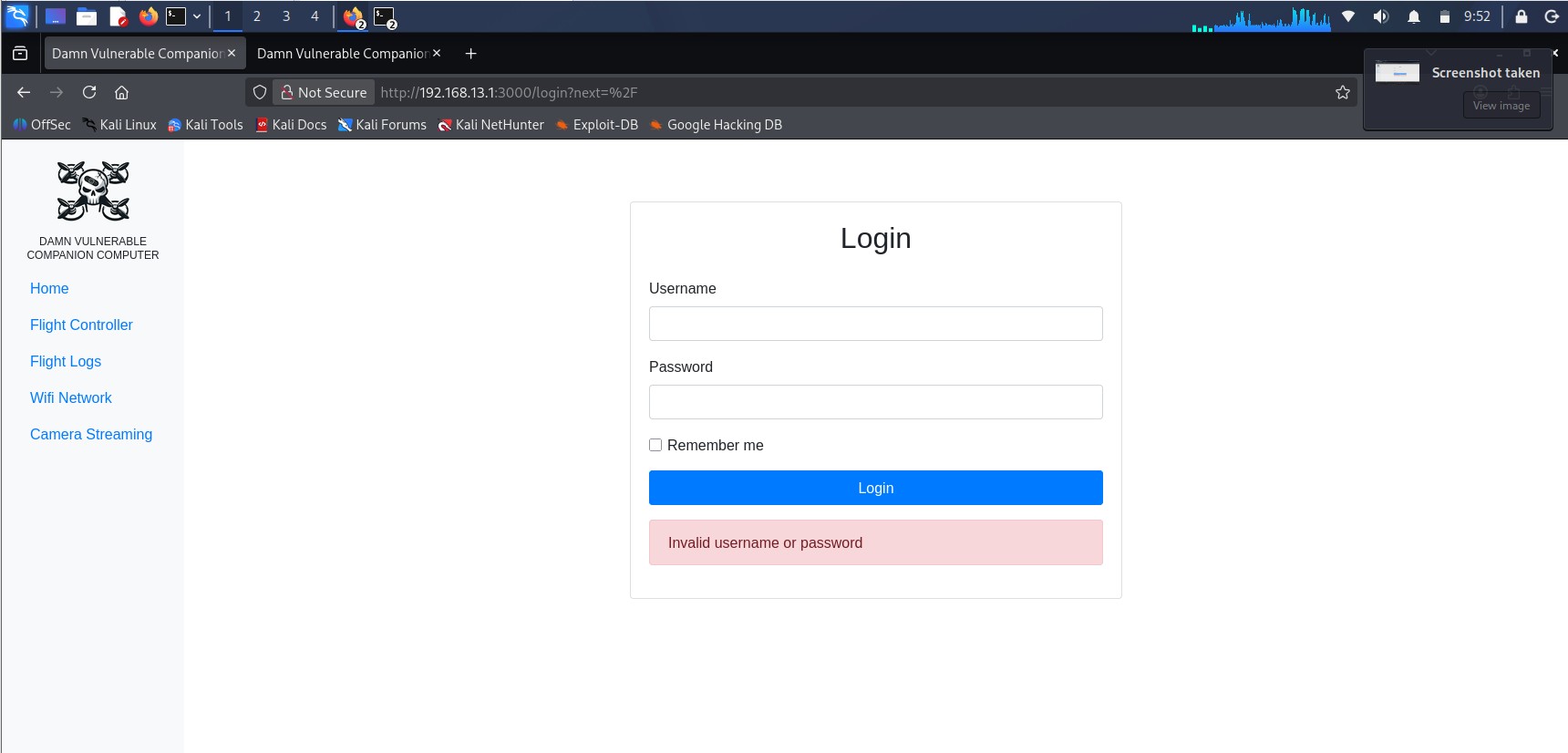 The target: the Companion Computer login form, showing “Invalid username or password” on a failed attempt.
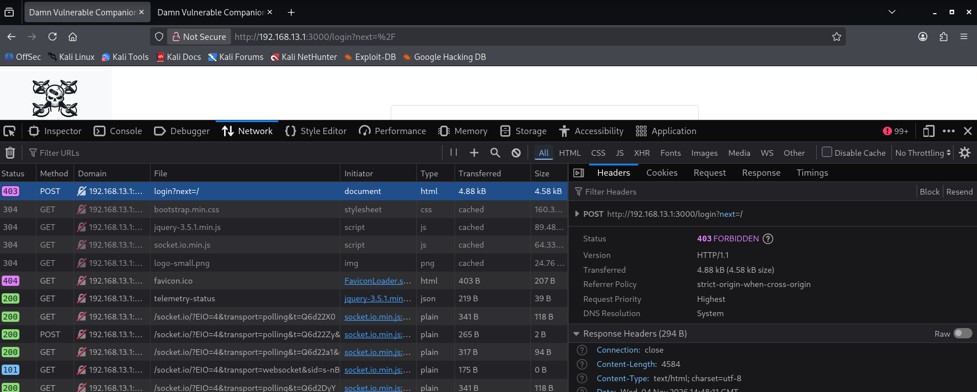 Headers: the login is
POST /login, and a failure returns HTTP 403 FORBIDDEN.
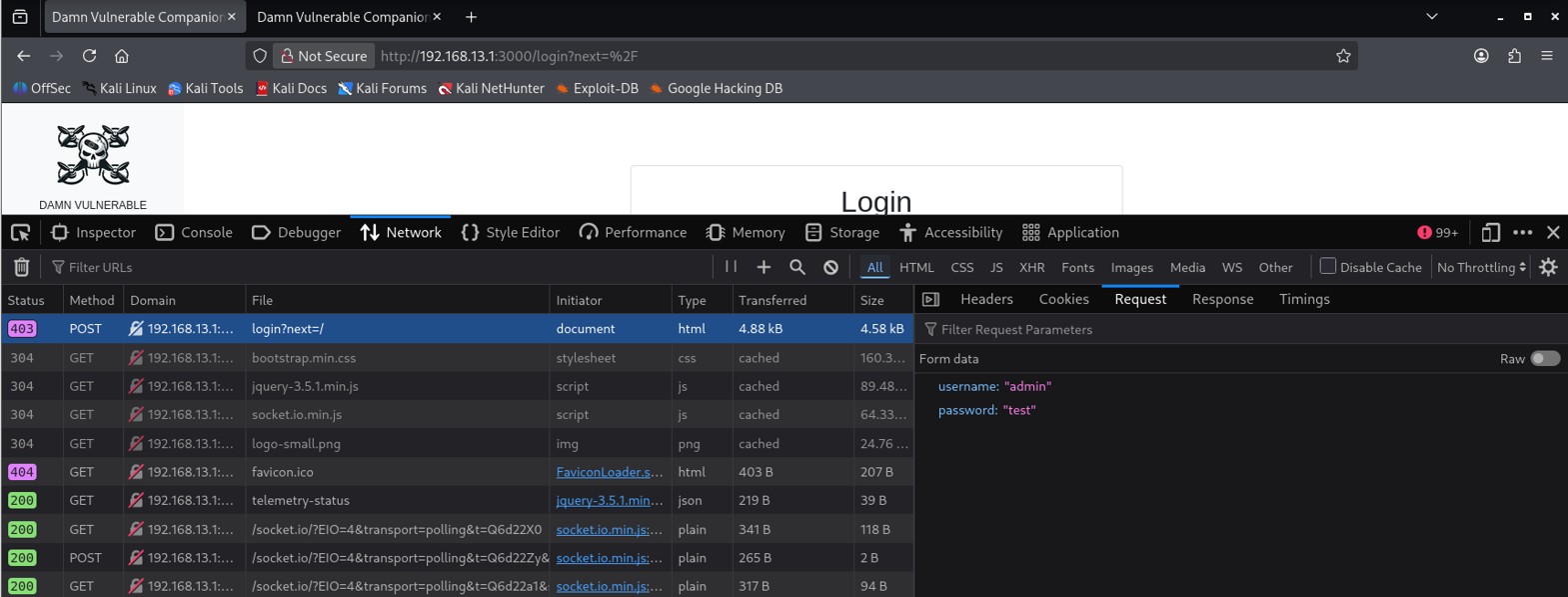 Request form data confirms the field names:
username and password.
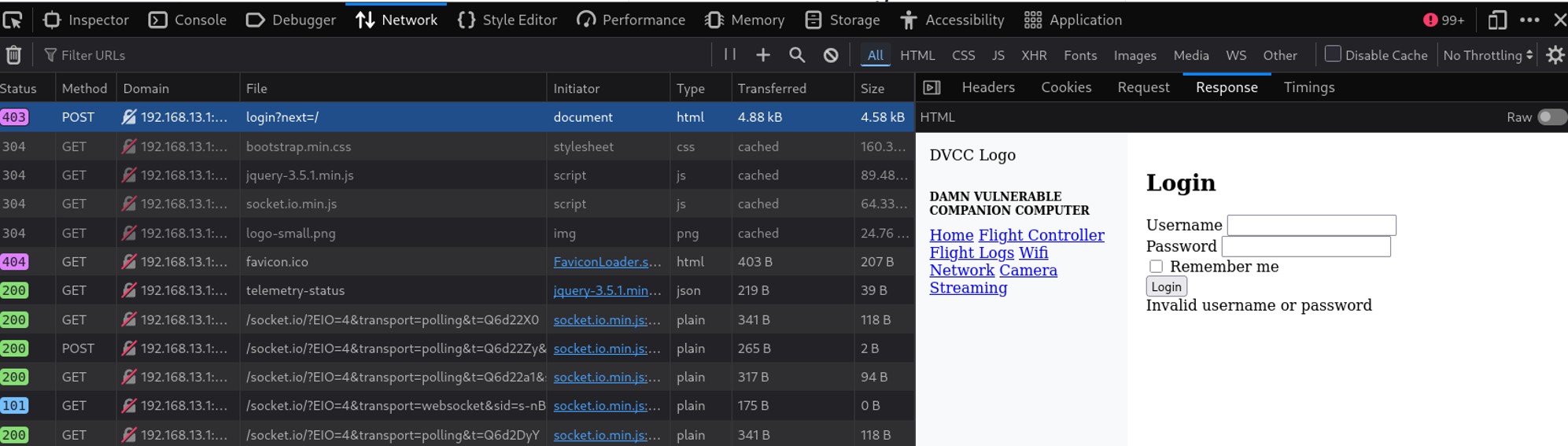 Response body contains the failure string
Invalid username or password — the marker hydra uses to detect a failed attempt.
So: endpoint POST /login, fields username/password, failure string Invalid username or password (plus a 403).
Attack
DVD ships its own password list inside the repo (no internet needed). hydra against the admin account:
1
2
3
4
hydra -l admin \
  -P ~/Damn-Vulnerable-Drone/simulator/mgmt/templates/pages/attacks/injection/passwords.txt \
  -s 3000 192.168.13.1 http-post-form \
  "/login:username=^USER^&password=^PASS^:Invalid username or password"
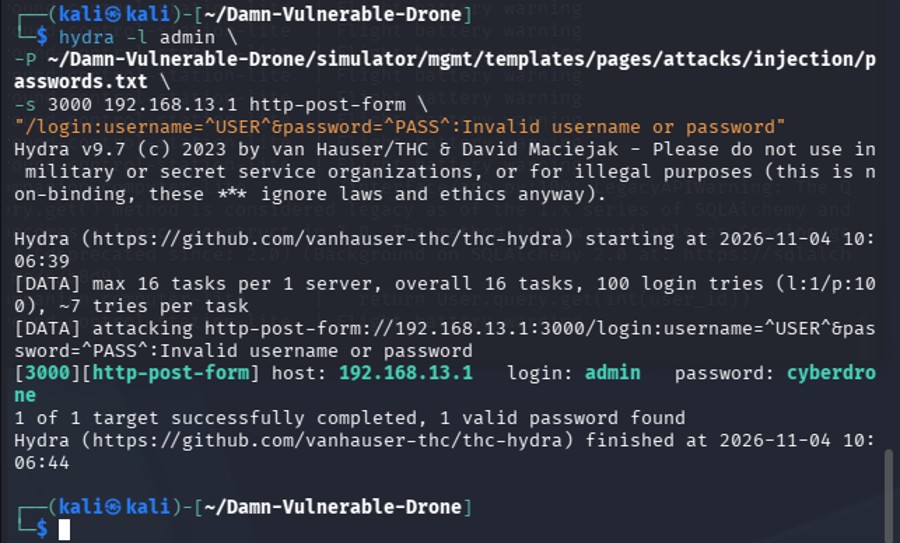 hydra recovers the credentials within 100 tries:
login: admin password: cyberdrone.
1
2
[3000][http-post-form] host: 192.168.13.1   login: admin   password: cyberdrone
1 of 1 target successfully completed, 1 valid password found
Logging in lands on the Companion Computer Web Interface, which even exposes its Current Config:
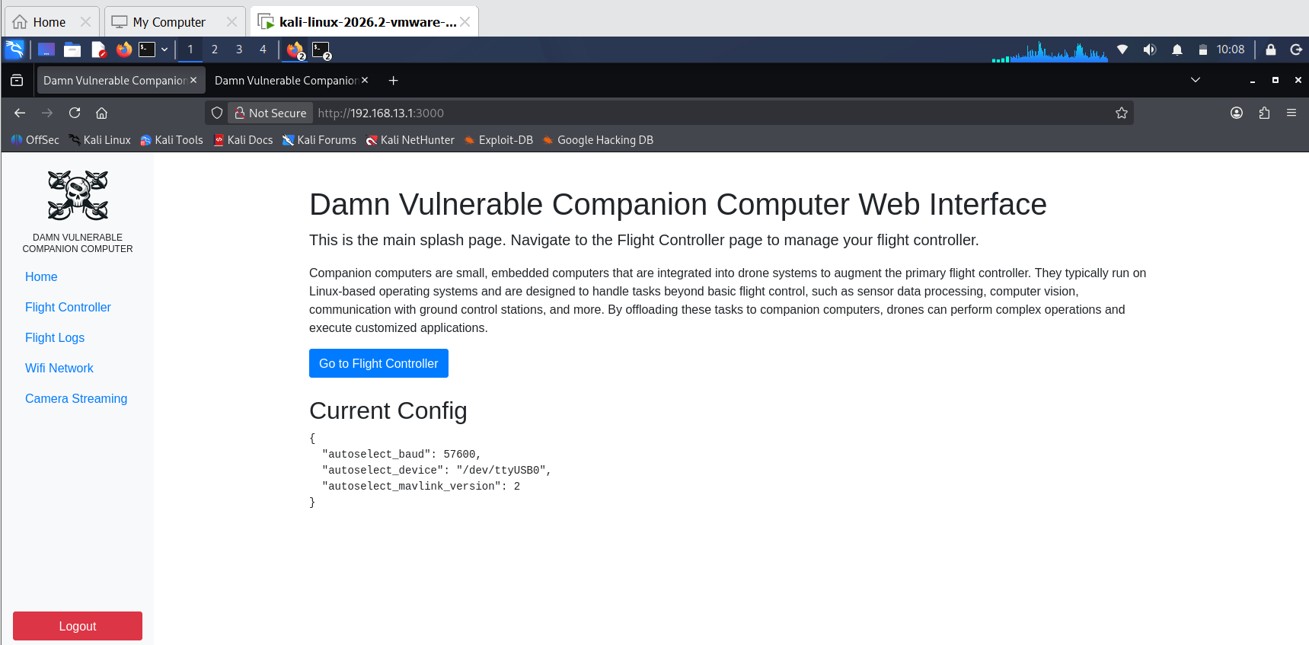 Foothold established. The dashboard leaks the Current Config:
autoselect_baud: 57600, /dev/ttyUSB0, mavlink_version: 2.
What it proves
The management web (3000) on this little Linux box strapped to the drone uses credentials weak enough to fall to a common password list — and, more importantly, it has no rate limiting or account lockout, so unlimited guessing works. This is where the drone’s attack surface moves from “a dedicated protocol (MAVLink)” to “an ordinary IT weakness (weak web auth).” A Companion Computer is, after all, a Linux server, so the usual web weaknesses exist on it too.
And this login isn’t the end — it’s the gateway. The menu inside the web UI — Flight Controller / Flight Logs / Camera Streaming — is the entry point for what comes next.
Exercise 4. Camera Feed Eavesdropping — vulnerability present, payoff not reproduced
Goal
Grab what “Camera Streaming” from Exercise 3 points at: the RTSP stream on port 554, carrying the drone’s onboard camera feed. It’s the Exfiltration piece, and it bookends Part 1’s WEP break-in (coming in over the air) — “take the drone’s eyes too.”
Running it
1
ffplay rtsp://192.168.13.1:554/stream1
RTSP’s default port is 554, so
rtsp://host/stream1with no port still connects to 554 (same idea as HTTP 80 / HTTPS 443). You only need to spell out the port if the server uses a non-standard one (e.g. 8554).
Result: a 503, and an honest failure
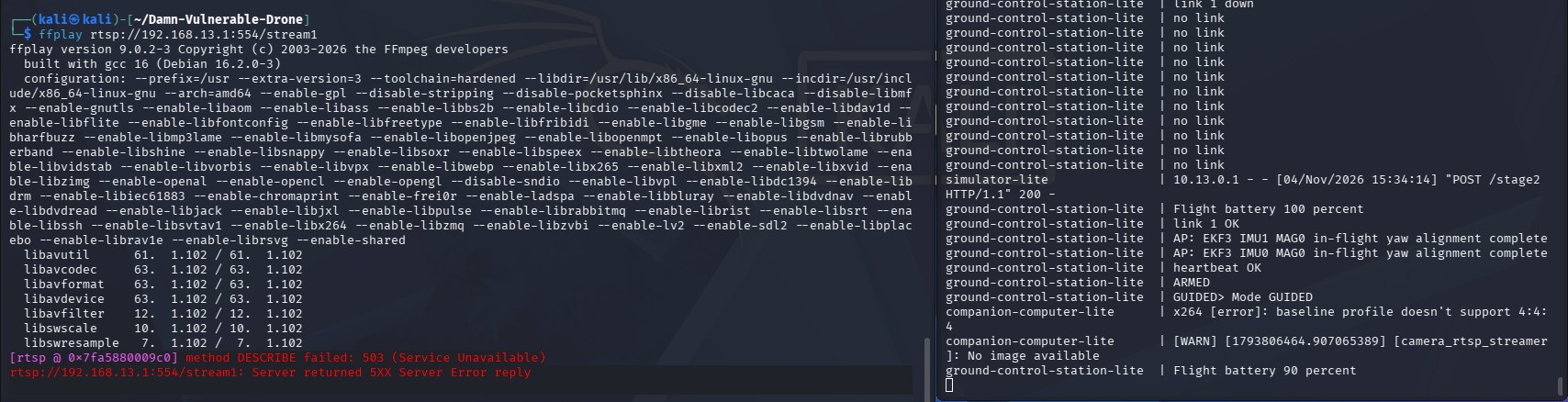 The RTSP server is reachable (it answered DESCRIBE), but returns 503. The companion log shows why:
No image available and an x264 encoder error.
1
2
[rtsp @ ...] method DESCRIBE failed: 503 (Service Unavailable)
rtsp://192.168.13.1:554/stream1: Server returned 5XX Server Error reply
The DVD log gave the real cause:
1
2
companion-computer | [WARN] camera_rtsp_streamer: No image available
companion-computer | x264 [error]: baseline profile doesn't support 4:4:4
Two problems stacked up: (1) the camera streamer had no frame to encode (No image available), and (2) the x264 encoder is refusing to encode because a baseline profile was fed a 4:4:4 color format. Restoring the battery to 100% did not clear the x264 4:4:4 error.
Honest conclusion
This isn’t a command or network problem. My method — asking for /stream1 with ffplay — was correct, and the RTSP server accepted the DESCRIBE request without authentication, so the design vulnerability (unauthenticated RTSP) is real. But I could not reproduce the actual feed. DVD Lite mode is a GPU-less 2D simulator, so the camera rendering pipeline (the x264 encoder) is unstable; without Full mode (Gazebo 3D) no frames appear to be produced.
Takeaway (same shape as Exercise 1): an open 554 in recon does not mean video just flows. Stream capture presupposes an operational condition — a live camera pipeline. The existence of the vulnerability (no auth) and the attack’s success condition (feed running) are separate things.
Part 2 wrap-up
The four exercises ended four different ways.
| Exercise | Category | Result |
|---|---|---|
| 1. GPS Spoofing | Protocol Tampering | Partial — altitude/state injected, position rejected by EKF |
| 2. Flight Mode Injection | Injection | Success — ACK ACCEPTED, mode changed |
| 3. Web UI Brute Force | Injection | Success — admin:cyberdrone, web UI taken over |
| 4. Camera Eavesdropping | Exfiltration | Vulnerability confirmed (unauth RTSP), feed not reproduced (env limit) |
If Part 1 was “break in over the air and identify the internal assets,” Part 2 was, from that foothold, attempting real attacks and finding how far each one reaches. The one line that runs through all four is this:
MAVLink protects observations with sensor fusion but leaves control commands unauthenticated (Exercises 1–2), and the ordinary Linux/web stack layered on top inherits ordinary IT vulnerabilities as-is (Exercises 3–4). Drone security isn’t just an avionics-protocol problem — it’s a problem of the protocol and the whole computer it runs on.
The two that didn’t fully land (position spoofing in #1, feed capture in #4) each leave a hook for next time — a more precise attack (GPS Data Injection) and a more complete environment (Full mode), respectively. I’ll leave those for after this series.